

This year, generative and agentic AI tools have become an essential part of my tool-set as a software developer. In 2023 and 2024, AI usage in software development tools exploded with features such as integrated chat panels in popular editors and code completion/generation that appears as the user types changes in a source file. Even though I found those tools occasionally useful, I never felt that they represented a significant shift in my workflow and productivity.
I started using agentic tools for the first time this year. My introductory tool was Cline, an open source coding agent that integrates with VS Code as an extension. Cline works by connecting to your preferred model provider service for which you have to provide an API key. After setting up the API key, you prompt the model using chat-style UI, and unlike classic chat tools, Cline can execute CLI tools, edit files, and run tests, based on your commands.
In the second half of the year, I started using Claude code, which replaces the integrated chat UI with a CLI tool that loosely integrates with your editor of choice. The main advantage of a CLI tool compared to the chat UI is the ability to create more automated and parallel flows. You can have multiple, specialized agents running in parallel as separate terminal processes. I’m also lucky enough to contribute to the development of agentic tools while working at GitLab. I’m dog-fooding these tools every day and many of the use cases that I’ll mention in the sections below happen in the context of these tools.
Generative and Agentic AI tools changed the way that I develop software. I can report bugs and draft ideas quicker. I can communicate complex ideas more clearly generating Mermaid diagrams and iteratively refining them. I feel more confident and willing to contributing to projects that I don’t have deep expertise in. And it’s so fun to explore what’s possible with technologies that I don’t know deeply. The following sections expand on each of these use cases.
Generating diagrams
In a remote workplace, it’s challenging to replicate the in-person whiteboard sessions where two or more people can sketch diagrams to communicate high level ideas and build a mutual understanding. Even though there are amazing real-time collaboration tools, I usually strive to communicate ideas as clearly as possible in a written format before jumping to a call. When communicating asynchronously via written notes, dedicating time to conveying an idea using a diagram consumes a lot of time. This aspiration raises the bar for what a diagram should be: Choosing the correct type of diagram and making it clear and useful without excess detail becomes more important.
I’m a fan of Mermaid, a JavaScript-based tool that allows creating all sorts of diagrams using a powerful Domain Specific Language:
 graph TD;
    A-->B;
    A-->C;
    B-->D;
C-->D; 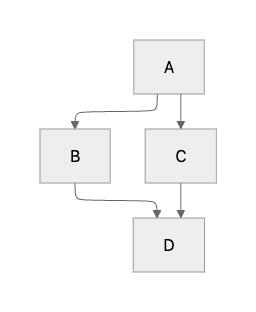
Generative AI reduces the time to produce useful diagrams from hours to minutes. Models are quite good at identifying associations, grouping related nodes, and generating color palettes. Exploring what an idea looks like in different types of diagrams is faster than ever. I begin by writing a prompt that describes my idea as a rough diagram, then I refine the model’s first result. For example, I suggested a team to use Storybook interaction testing framework to write integration tests that rely on user-centered commands and assertions.
I wanted to convey in a single diagram multiple ideas: How the testing framework interacts with the UI components, that Storybook provides a mock backend that the state management layer connects to, and how these tests fall in the integration test category. The model generated this diagram that I found overly complex:
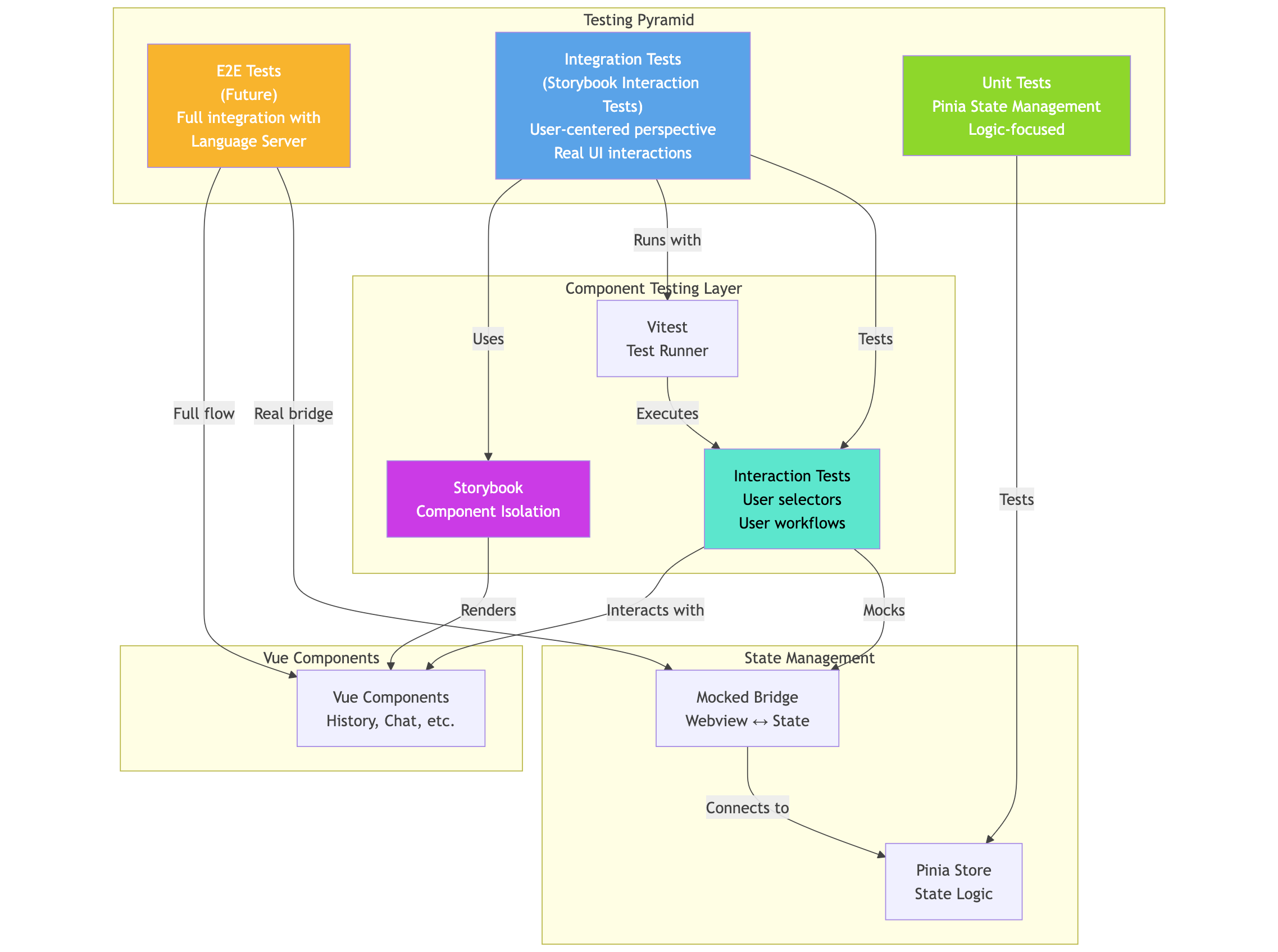
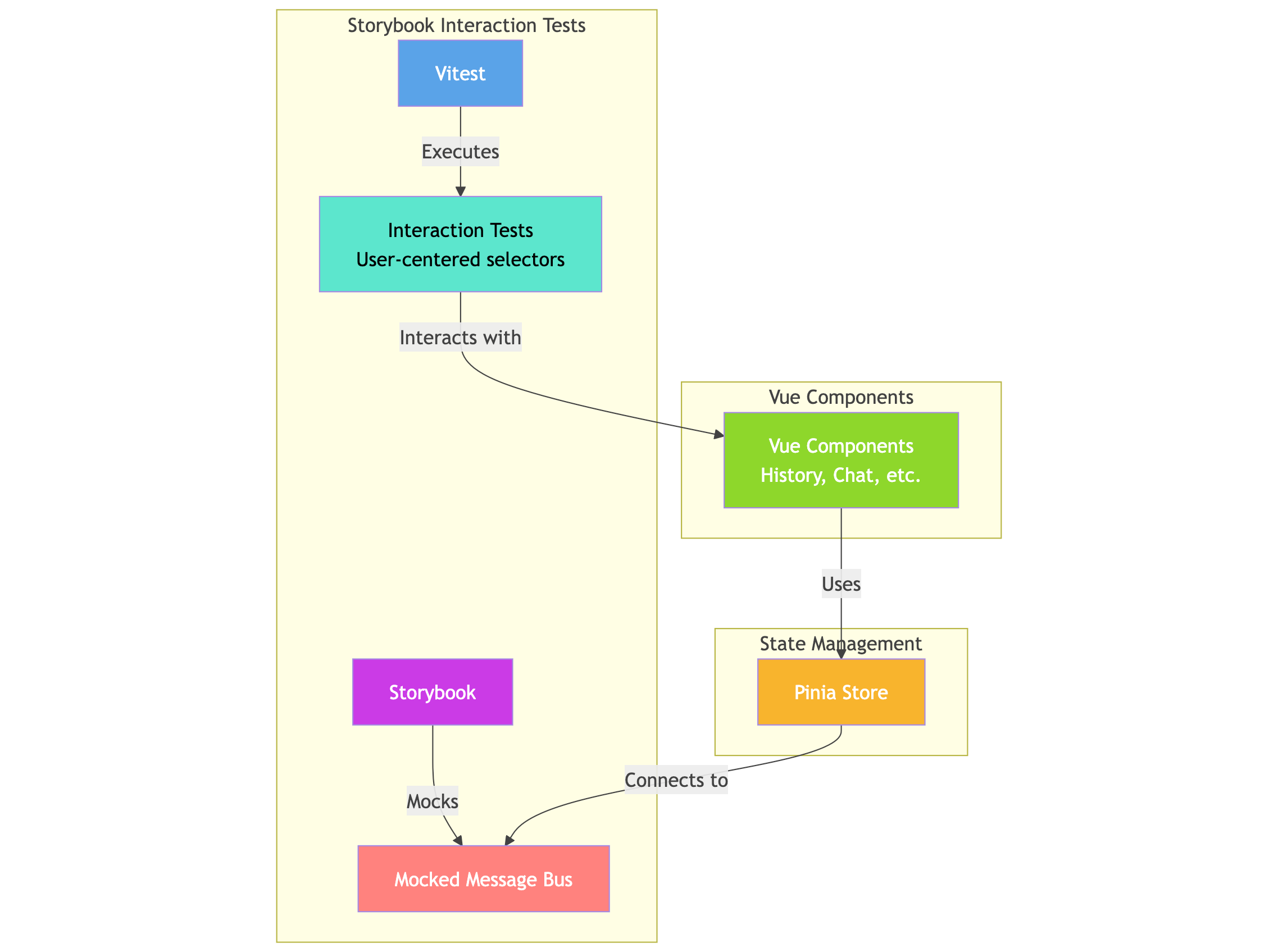
I send successive prompts to remove what I considered unnecessary elements of the initial proposal and simplify the information flow and associations. The result was a simpler and more focused diagram that conveyed my suggestion precisely.
“Remove the unit tests and e2e tests boxes. Focus the diagram on explaining the integration tests”.
“The diagram should only have three groups: Storybook interaction tests, Vue components, State management (Pinia) -> mocked message bus”.
“The Pinia store connects to the mocked message bus, not the opposite.”
“Storybook mocks the message bus and the vue components use the Pinia store”
Brainstorming and flattening the learning curve with agentic tools
My job demands me to learn quickly, adapt, and stretch beyond my current skillet. Agentic AI tools represent a game changer to my productivity because they speed up my process of on-boarding or starting new projects. They also help me realize what’s possible by generating prototypes from ideas that rely on tools that I would have to learn in detail before I can write a line of code.
I think that AI Agentic tools are specially powerful in the hands of experienced developers. I can translate heuristics and best practices that I’ve learned in one tech stack to another. Modern programming languages share similar design paradigms like functional programming, OOP, etc. And software design best practices such as loose-coupling/high cohesion, DRY, and are applicable to most projects. AI agentic tools help me to onboard quickly into the specific implementation details of a tech stack while my experience and understanding of functional/technical requirements guide my requests to agents. Code review of teammates that are subject matter experts serve guardrails to ensure that my contributions conform with idioms and project-specific conventions.
For example, this year, we had to set up an e2e testing framework to test a Language Server in the web browser. Language servers run in a web worker for several reasons such as creating a sandboxed execution context (when loading the worker on a separate origin) and to prevent expensive operations from blocking the web browser’s main UI thread. We wanted to test web workers in a headless browser rather than using an environment that emulates web browser APIs such as JSDOM.
Agentic tools allowed me to develop three prototypes using several combinations of test runners and libraries in a single working day. Making a decision is much easier when we can uncover as many unknowns as possible. In the past, we have to time-box these exploration phase due to the usual time and resource constraints that affect software development projects.
Agentic tools have the potential of flattening the learning curve for contributing to a project without lowering the quality bar. To strike this balance, we should rely on a well known software development practices such as a strong code review process, continuous refactoring, and automating quality checks using test coverage tools, code linters, security scanners, etc.
2026
Next year, I want to scale my usage AI agents by executing them in parallel, learning how to create agents tailored for specific use cases, and automating complete flows. My usage of agents so far has involved significant supervision on my part by breaking down requirements into smaller tasks, providing feedback for every proposal, etc. I want to move away from this workflow and give agents more complex requirements that require longer periods of focus.
One area that I find very exciting is the evolution of agentic AI for accessibility and e2e testing. For example, Playwright 1.56 includes agent definitions for test planning, generation, and most importantly healing. The other area that I want to explore is automating the resolution of breaking changes when updating dependencies to major versions. This kind of maintenance work is crucial for the health of a project, however, it has historically represented a big cost for teams because of the amount of busywork involved.
When it comes to AI, every year feels different. The big players in the AI industry make seismic moves that transform the way we use these tools. I’m looking forward to all the new developments 2026 and how they will reshape my day-to-day work.